


Boards.com
4.6557.00 Reviews
App Specs
- Version
- 3.9.6
- Updated On
- License
- Free
- Downloads
- 1,000,000+
- Developer
- Boards.com
- Categories
- Business
- Platform
- Android, iOS
Screenshots



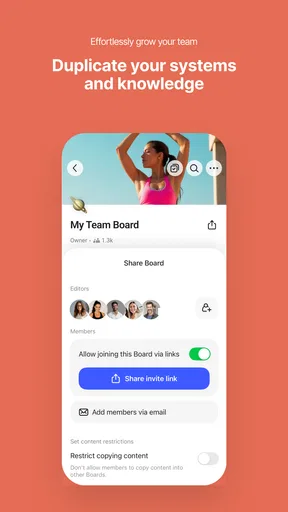

 Analysis by AppCompare
I like trying tools that give a messy project a visible shape, and Boards.com makes that idea easy to understand. I’d use it when a list of loose tasks has grown too long to scan comfortably, or when several people need a shared place to see what is moving and what is stuck. Its board-based approach is the main draw: instead of treating every task as a line in an endless list, I can arrange work into spaces that reflect how I actually think about it.
A practical starting rhythm
For a new project, I’d begin with one board and a small number of clear task groups rather than trying to map every possible step before doing any work. A home renovation, for example, could start with “To decide,” “In progress,” and “Done.” As I collect quotes or make choices, I can move the relevant task instead of rewriting the plan. That visible change is useful because it lets me see progress at a glance without turning the board into a complicated project-management system.
This is also where I’d keep the scope honest. A board works well when the work has a recognizable boundary: a client deliverable, a family event, a study plan, or a recurring set of office tasks. If I try to put every obligation in my life onto one board, the overview can become cluttered and stop helping. I’d rather create separate boards for unrelated areas and keep each one focused on a decision or outcome.
Settings and small habits worth checking
Boards.com is a free business app from Boards.com, and it is rated for Everyone. Its current version is 3.4.2, with Android 9 as the minimum operating system requirement. I’d check that requirement before installing on an older phone, then spend a few minutes choosing board names and visual styles that make the spaces easy to distinguish. Colors and backgrounds are not just decoration if they help me avoid opening the wrong project while I’m in a hurry.
The app has a 4.5 average from around 17,000 ratings, and more than a million installs. That kind of adoption makes it easier to see why someone might want to try it, but I would still judge it by whether its layout fits my own workflow. It is free to start, while in-app purchases range from $5.99 to $239.90 per item, so I’d review the purchase options in the app before relying on a paid capability for a team process.
One useful habit is to make task titles specific enough that another person can act without asking what I meant. “Check venue” is vague; “Ask the venue about Saturday access” gives a teammate a clear next move. I’d also attach supporting material to the task it belongs to rather than scattering documents across messages. That keeps the board useful as a working record, not merely a place where tasks go to be forgotten.
Faster patterns for solo and shared work
Boards.com describes itself with a one-tap focus, and in practice I’d treat speed as a habit rather than expecting the app to organize everything automatically. When a new request arrives, I can put it on the relevant board while the context is fresh, then decide its order when I review the board. The drag-and-drop interaction makes reprioritizing feel direct: I can move a task to reflect a changed deadline or dependency instead of maintaining a separate handwritten ranking.
Worth Reading Before You Choose

EA SPORTS FC Mobile 26 Is a Bigger Football Game, but It Takes Time

Flipboard Shows What News Apps Must Do Beyond the Feed

Switching to Android Auto Means Rethinking Your Driving Routine

Google Calendar Makes a Crowded Week Easier to Manage

Ludo King Makes the Most of the Minutes Between Plans

Baby Panda World Brings Quick Play to Modern Phones, but Its Game Library Feels Busy
For a small team, I’d agree on what each group means before inviting everyone to use the board. If one person treats “In progress” as work started and another uses it to mean work assigned, the board quickly becomes misleading. A short shared convention—what counts as done, where questions belong, and who owns the next action—can prevent more confusion than adding extra columns. Comments and task assignments are most useful when they record a decision or a clear handoff, rather than reproducing a long chat thread.
For a realistic day-to-day example, imagine I’m coordinating a presentation with two colleagues. I’d put the outline, research, slides, and final review in one place, assign the next action where ownership matters, and attach the working files to the relevant tasks. If a colleague spots a missing source, that can become a specific task instead of disappearing in a message exchange. Before the meeting, I can scan what is unfinished and ask about the exact blocker, which is more practical than asking everyone for a broad status update.
Where it fits—and where I’d choose another tool
The board format sits between a plain checklist and a more formal project-management platform. Compared with a notes app or a basic to-do list, it gives work a more visual structure and makes task movement easier to interpret. Compared with heavier project software, it is approachable for a person or a small group that mainly needs shared visibility. That middle ground is the appeal, but it also means I would not assume it replaces every specialist tool a business uses.
If my work depends on detailed timelines, complex dependencies, reporting, or a carefully controlled approval process, I’d compare it with a dedicated project-management option before moving a whole operation over. Likewise, if I only need a private shopping list, a simpler checklist may take less effort to maintain. Boards.com makes more sense when the visual state of work is genuinely useful—when I need to see what is waiting, underway, and complete, not just store a note.
Collaboration is helpful, but it asks the group to keep the board current. Real-time updates cannot make a stale task accurate, and comments do not remove the need to agree on who is responsible. I’d set a lightweight review habit, perhaps checking the board at the start or end of a work session, rather than expecting everyone to monitor it constantly. That keeps the tool from becoming another notification destination that competes with the work itself.
Learning the app without overbuilding the process
The strongest way to get value from Boards.com is to begin with a real project, not a perfect template imagined in advance. I’d add only the tasks I can act on, use color to distinguish boards when that genuinely helps, and test whether attachments and comments keep context close to the work. After a few days, I can remove groups that are not useful and rename any that people interpret differently. A board should make the next action clearer, not demand ongoing housekeeping for its own sake.
There are a few practical questions I’d settle before making it central to a workflow. Can everyone who needs access use the app on a supported device? Does the free setup cover the way the group intends to work? Are the purchase options worth considering for the specific need, rather than just because they are available? I’d answer those by trying a small, low-risk board first and confirming the team’s routine before moving sensitive or time-critical work into a new system.
I’d also be selective about what I attach. Keeping task-related files together can save searching, but a board is not automatically a substitute for a team’s established document storage or record-keeping practice. I would attach what helps someone complete the task and leave authoritative copies where the team expects them. That small distinction avoids confusion about which file is current, especially when several people are editing related material.
For an individual, the best test is whether the board makes a busy week easier to scan. For a team, the test is whether a colleague can open it and understand the next action without a separate explanation. If either test fails, I’d simplify the board before adding more structure. The app’s flexibility is valuable, but flexibility can tempt me to design a system that looks organized while taking too long to maintain.
Boards.com is a sensible choice for people who prefer visual task organization and need a shared workspace that feels less formal than a large project suite. I’d recommend trying it for one bounded project and keeping the workflow deliberately small at first. If the board helps people make decisions and hand work over cleanly, expand it; if the team needs deep planning controls or a simple private checklist, choose a tool built more closely around that need.
Ever stumbled upon an app that makes you go, "Where has this been all my life?" Well, I recently had that moment with Boards.com. If you're juggling multiple tasks, projects, or even just trying to keep your life in order, this app might just be your new best friend. Trust me; I didn't think a productivity app could be so engaging until I gave it a whirl.
Getting Started with Boards.com
The first thing I noticed about Boards.com was how uncomplicated it was to dive right in. The app greets you with a clean, intuitive interface that doesn't require a PhD to navigate. Creating a new board is as simple as tapping a button, and once you're in, the possibilities feel endless. Whether you're planning a vacation, managing a work project, or just organizing your grocery list, each board can be tailored to whatever you need.
Features That Stand Out
Now, let's talk features. The drag-and-drop functionality is a game-changer. Moving tasks around is seamless, and it feels as natural as rearranging Post-it notes on a wall. You can customize the look and feel of your boards with different colors and backgrounds, which, for someone like me who thrives on aesthetics, is a huge plus.
The app also offers integrations with other tools I already use daily, like Google Calendar and Slack. This helps keep everything in sync without having to jump between apps constantly. It's like having a personal assistant in your pocket.
Collaboration Made Easy
If you're working with a team, Boards.com really shines. You can invite team members to your boards, assign tasks, and even leave comments. The real-time updates mean everyone stays on the same page, literally. No more endless email chains or missed updates; it’s all right there on your board.
The app also supports file attachments, so you can add documents, images, or links directly to your tasks. This feature has been a lifesaver when trying to keep everything organized for a big project. Everything related to a task is right there, which saves a ton of time.
Why I’m Hooked
So, what’s the verdict? Quite simply, Boards.com has become an essential part of my toolkit. The app’s ability to adapt to any type of project, combined with its user-friendly design, makes it a standout choice for anyone looking to boost their productivity. I find myself using it daily, whether it's for work or personal projects, and I've noticed a significant improvement in how efficiently I manage my time.
One of the things I appreciate most is the flexibility. I can use it on both my Android phone and iOS tablet, and the experience is consistent across devices. Plus, the app's synchronization ensures that I always have the latest version of my boards, no matter where I am.
Final Thoughts
If you’re in the market for a productivity app that’s as versatile as it is powerful, give Boards.com a try. It’s perfect for solo projects or team collaborations, and it’s designed to make your life easier, not more complicated. I genuinely believe it’s one of those apps that you didn’t know you needed until you tried it.
Whether you’re a student, a professional, or just someone who loves staying organized, this app is worth a look. And hey, if you do end up trying it, I’d love to hear your thoughts!
Pros
- Intuitive user interface for quick navigation.
- Seamless integration with other productivity apps.
- Customizable boards to fit various project needs.
- Real-time collaboration enhances team efficiency.
- Offline mode for access without internet.
Cons
- Limited free version features.
- Occasional sync issues reported.
- No native time-tracking tools.
- Requires a steep learning curve initially.
- Mobile app lacks some desktop features.
FAQs for Boards.com
What is Boards.com and how does it work?
Boards.com is a versatile productivity app designed to enhance team collaboration and project management. It allows users to create boards for different projects, manage tasks, and communicate in real-time. The app integrates with various tools and platforms, offering a centralized workspace to streamline workflows and improve team efficiency.
Is Boards.com available on both Android and iOS?
Yes, Boards.com is available for download on both Android and iOS devices. Users can access it through the Google Play Store and Apple App Store. This cross-platform availability ensures seamless collaboration and access to your projects from any device, anytime.
What features does Boards.com offer for project management?
Boards.com offers a range of features to facilitate effective project management, including task creation, deadline setting, file sharing, and progress tracking. It also supports real-time collaboration and communication, allowing team members to share updates and feedback directly within the app, enhancing productivity and coordination.
Are there any subscription fees associated with Boards.com?
Boards.com offers both free and premium subscription plans. The free version provides essential features suitable for small teams or individual users. The premium plans, available at a monthly or annual fee, offer advanced features such as increased storage, integration options, and priority support, catering to larger teams and organizations.
How secure is my data on Boards.com?
Boards.com prioritizes user data security by employing industry-standard encryption protocols to protect data both in transit and at rest. The app also offers options for two-factor authentication to enhance account security. Regular updates and compliance with data protection regulations further ensure that your data is kept safe and secure.


